Adding custom metadata to PDF documents
Classes
Section titled “Classes”A set of classes allow you to integrate any kind of metadata into created PDFs.
CPdfCustomMetadata, representing the root container of metadataCPdfCustomMetadataContainerCPdfCustomMetadataPropertyCPdfCustomMetadataPropertyListCPdfCustomMetadataResource
Code Snippets
Section titled “Code Snippets”The simplest way to create custom metadata is to create a list of properties and attach it to the main container.
1. Creating a simple list of name:value properties
Section titled “1. Creating a simple list of name:value properties”// Create an IDRS objectCIDRS objIdrs = CIDRS::Create();
// Load the source imageCImageIO objImageIO = CImageIO::Create(objIdrs);CPage objPage = objImageIO.LoadPage("path/to/image");
// Setup and launch OCRCTextRecognition objTextRecognition = CTextRecognition::Create(objIdrs);objTextRecognition.RecognizeText(objPage);
// Create the propertiesCPdfCustomMetadataProperty objPropertyOne = CPdfCustomMetadataProperty::Create( "PropertyOneName", "PropertyOneValue");CPdfCustomMetadataProperty objPropertyTwo = CPdfCustomMetadataProperty::Create( "PropertyTwoName", "PropertyTwoValue");CPdfCustomMetadataProperty objPropertyThree = CPdfCustomMetadataProperty::Create( "PropertyThreeName", "PropertyThreeValue");CPdfCustomMetadataProperty objPropertyFour = CPdfCustomMetadataProperty::Create( "PropertyFourName", "PropertyFourValue");
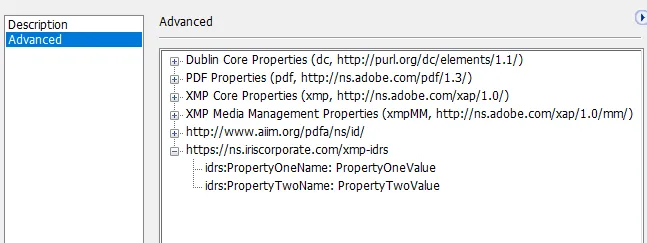
// Create property list with custom namespaceCPdfCustomMetadataPropertyList objCustomMetadataPropertyListWithNS = CPdfCustomMetadataPropertyList::Create();objCustomMetadataPropertyListWithNS.AddProperty(objPropertyOne);objCustomMetadataPropertyListWithNS.AddProperty(objPropertyTwo);
CPdfCustomMetadataPropertyList objCustomMetadataPropertyListWithNS2 = CPdfCustomMetadataPropertyList::Create();objCustomMetadataPropertyListWithNS2.AddProperty(objPropertyThree);objCustomMetadataPropertyListWithNS2.AddProperty(objPropertyFour);
// Create metadata object and add the list propertyCPdfCustomMetadata objPdfCustomMetadata = CPdfCustomMetadata::Create();objPdfCustomMetadata.Add(objCustomMetadataPropertyListWithNS);objPdfCustomMetadata.Add(objCustomMetadataPropertyListWithNS2);
// Create pdf output parameter object and set the custom metadataCPdfOutputParams objPdfOutputParams = CPdfOutputParams::Create( PdfVersion::Pdf17, PageDisplay::TextAndGraphics);
objPdfOutputParams.SetPdfCustomMetadata(objPdfCustomMetadata);
// Create a DocumentWriter object and save the documentCDocumentWriter objDocumentWriter = CDocumentWriter::Create(objIdrs);objDocumentWriter.SetOutputParams(objPdfOutputParams);objDocumentWriter.Save("Path to the output.pdf", &objPage, 1);// Create an IDRS objectusing (CIDRS objIdrs = new CIDRS()){ // Create a page object and load the source image using (CImageIO objImageIO = new CImageIO(objIdrs)) using (CPage objPage = objImageIO.LoadPage("myimage")) { // Setup and launch OCR using (CTextRecognition objTextRecognition = new CTextRecognition(objIdrs)) { objTextRecognition.RecognizeText(objPage);
// Create the properties CPdfCustomMetadataProperty objPropertyOne = new CPdfCustomMetadataProperty( "PropertyOneName", "PropertyOneValue"); CPdfCustomMetadataProperty objPropertyTwo = new CPdfCustomMetadataProperty( "PropertyTwoName", "PropertyTwoValue"); CPdfCustomMetadataProperty objPropertyThree = new CPdfCustomMetadataProperty( "PropertyThreeName", "PropertyThreeValue"); CPdfCustomMetadataProperty objPropertyFour = new CPdfCustomMetadataProperty( "PropertyFourName", "PropertyFourValue");
// Create property list with custom namespace CPdfCustomMetadataPropertyList objCustomMetadataPropertyListWithNS = new CPdfCustomMetadataPropertyList(); objCustomMetadataPropertyListWithNS.AddProperty(objPropertyOne); objCustomMetadataPropertyListWithNS.AddProperty(objPropertyTwo);
CPdfCustomMetadataPropertyList objCustomMetadataPropertyListWithNS2 = new CPdfCustomMetadataPropertyList(); objCustomMetadataPropertyListWithNS2.AddProperty(objPropertyThree); objCustomMetadataPropertyListWithNS2.AddProperty(objPropertyFour);
// Create metadata object and add the list property using (CPdfCustomMetadata objPdfCustomMetadata = new CPdfCustomMetadata()) { objPdfCustomMetadata.Add(objCustomMetadataPropertyListWithNS); objPdfCustomMetadata.Add(objCustomMetadataPropertyListWithNS2);
// Create pdf output parameter object and set the custom metadata using (CPdfOutputParams objPdfOutputParams = new CPdfOutputParams( PdfVersion.Pdf17, PageDisplay.TextAndGraphics)) { // Create a DocumentWriter object and save the document using (CDocumentWriter objDocumentWriter = new CDocumentWriter(objIdrs)) { objDocumentWriter.OutputParams = objPdfOutputParams; objPdfOutputParams.PdfCustomMetadata = objPdfCustomMetadata; objDocumentWriter.Save("Path to the output.pdf", new List<CPage>() { objPage }.ToArray()); } } } } }}Will produce this output
2. Creating bag containers (Bag containers can gather lists of properties)
Section titled “2. Creating bag containers (Bag containers can gather lists of properties)”// Create an IDRS objectCIDRS objIdrs = CIDRS::Create ();// Create a page object and load the source imageCImage objImage = CImage::Create(objIdrs, idrs_t("Path to image to load"))CPage objPage = CPage::Create (objImage);
// Launch OCRCTextRecognition objTextRecognition = CTextRecognition::Create (objIdrs);objTextRecognition.RecognizeText (objPage);
// Create the propertiesCPdfCustomMetadataProperty objPropertyOne = CPdfCustomMetadataProperty::Create ( "PropertyOneName", "PropertyOneValue");CPdfCustomMetadataProperty objPropertyTwo = CPdfCustomMetadataProperty::Create ( "PropertyTwoName", "PropertyTwoValue");CPdfCustomMetadataProperty objPropertyThree = CPdfCustomMetadataProperty::Create ( "PropertyThreeName", "PropertyThreeValue");CPdfCustomMetadataProperty objPropertyFour = CPdfCustomMetadataProperty::Create ( "PropertyFourName", "PropertyFourValue");
// Create property list with custom namespaceCPdfCustomMetadataPropertyList objCustomMetadataPropertyListWithNS = CPdfCustomMetadataPropertyList::Create ();objCustomMetadataPropertyListWithNS.AddProperty (objPropertyOne);objCustomMetadataPropertyListWithNS.AddProperty (objPropertyTwo);
CPdfCustomMetadataPropertyList objCustomMetadataPropertyListWithNS2 = CPdfCustomMetadataPropertyList::Create ();objCustomMetadataPropertyListWithNS2.AddProperty (objPropertyThree);objCustomMetadataPropertyListWithNS2.AddProperty (objPropertyFour);
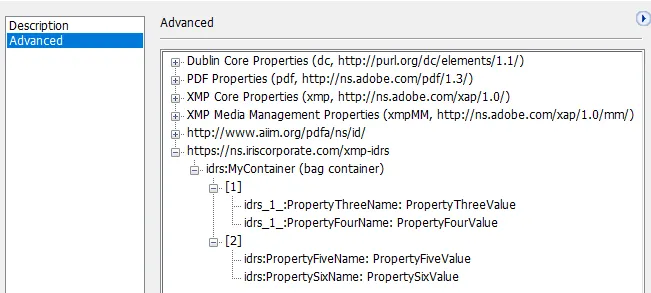
// Create a bag container, append the property lists to it.CPdfCustomMetadataContainer objPdfCustomMetadataContainer = CPdfCustomMetadataContainer::Create ("MyContainer");objPdfCustomMetadataContainer.Add (objCustomMetadataPropertyListWithNS);objPdfCustomMetadataContainer.Add (objCustomMetadataPropertyListWithNS2);
// Create metadata object and add the list propertyCPdfCustomMetadata objPdfCustomMetadata = CPdfCustomMetadata::Create ();objPdfCustomMetadata.Add (objPdfCustomMetadataContainer);
// Create pdf output parameter object and set the custom metadataCPdfOutputParams objPdfOutputParams = CPdfOutputParams::Create ( PdfVersion::Pdf17, PageDisplay::TextAndGraphics);
// Create a DocumentOutput object and save the documentCDocumentWriter objDocumentWriter = CDocumentWriter::Create (objIdrs);objDocumentWriter.SetOutputParams(objPdfOutputParams);
objPdfOutputParams.SetPdfCustomMetadata (objPdfCustomMetadata);objDocumentWriter.Save ( idrs_t ("Path to the output.pdf"), &objPage,1);// Create an IDRS objectusing (CIDRS objIdrs = new CIDRS()){ // Create a page object and load the source image using (CImageIO objImageIO = new CImageIO(objIdrs)) using (CPage objPage = objImageIO.LoadPage("myimage")) { // Setup and launch OCR using (CTextRecognition objTextRecognition = new CTextRecognition(objIdrs)) { objTextRecognition.RecognizeText(objPage);
// Create the properties CPdfCustomMetadataProperty objPropertyOne = new CPdfCustomMetadataProperty( "PropertyOneName", "PropertyOneValue"); CPdfCustomMetadataProperty objPropertyTwo = new CPdfCustomMetadataProperty( "PropertyTwoName", "PropertyTwoValue"); CPdfCustomMetadataProperty objPropertyThree = new CPdfCustomMetadataProperty( "PropertyThreeName", "PropertyThreeValue"); CPdfCustomMetadataProperty objPropertyFour = new CPdfCustomMetadataProperty( "PropertyFourName", "PropertyFourValue");
// Create property list with custom namespace CPdfCustomMetadataPropertyList objCustomMetadataPropertyListWithNS = new CPdfCustomMetadataPropertyList(); objCustomMetadataPropertyListWithNS.AddProperty(objPropertyOne); objCustomMetadataPropertyListWithNS.AddProperty(objPropertyTwo);
CPdfCustomMetadataPropertyList objCustomMetadataPropertyListWithNS2 = new CPdfCustomMetadataPropertyList(); objCustomMetadataPropertyListWithNS2.AddProperty(objPropertyThree); objCustomMetadataPropertyListWithNS2.AddProperty(objPropertyFour);
// Create metadata object and add the list property using (CPdfCustomMetadata objPdfCustomMetadata = new CPdfCustomMetadata()) { objPdfCustomMetadata.Add(objCustomMetadataPropertyListWithNS); objPdfCustomMetadata.Add(objCustomMetadataPropertyListWithNS2);
// Create pdf output parameter object and set the custom metadata using (CPdfOutputParams objPdfOutputParams = new CPdfOutputParams( PdfVersion.Pdf17, PageDisplay.TextAndGraphics)) { // Create a DocumentWriter object and save the document using (CDocumentWriter objDocumentWriter = new CDocumentWriter(objIdrs)) { objDocumentWriter.OutputParams = objPdfOutputParams; objPdfOutputParams.PdfCustomMetadata = objPdfCustomMetadata; objDocumentWriter.Save("Path to the output.pdf", new List<CPage>() { objPage }.ToArray()); } } } } }}Will produce this output