Adding attachments to PDF documents
How to
Section titled “How to”To set attachments to a PDF, use the class CAttachment and add them via the property Attachments of the document’s CDocumentMetadata instance.
The CDocumentMetadata instance is accessible via the property DocumentMetadata of the class CDocument.
Creating PDF/A-3 documents
Section titled “Creating PDF/A-3 documents”The iDRS can also create PDF/A-3a and/or PDF/A-3b documents.
PDF/A-3 standard differs from PDF/A-2 only because it allows embedding any type of file inside the PDF.
Limitations
Section titled “Limitations”It is NOT possible to add attachments to PDF/A-1 or PDF/A-2 (not supported)
Code Snippets
Section titled “Code Snippets”//How to create a *PDF/A-3 with an attached XML file*?
// Create an IDRS objectCIDRS objIdrs = CIDRS::Create();
// Load the source imageCImageIO objImageIO = CImageIO::Create(objIdrs);CPage objPage = objImageIO.LoadPage("path/to/image");
// Create a page recognition object and do recognitionCTextRecognition objTextRecognition = CTextRecognition::Create(objIdrs);objTextRecognition.RecognizeText(objPage);
// Create a CAttachmentArray and add an attachment to itCAttachmentArray xAttachments = CAttachmentArray::Create();
CAttachment objAttachment = CAttachment::Create( "My attachment.xml name", CAttachment::TypeXml, "Path to my attachment.xml file");
xAttachments.AddTail(objAttachment);
// Create a document and set the attachments in its metadataCDocument objDocument = CDocument::Create(objIdrs);objDocument.GetPages().AddTail(objPage);objDocument.GetMetadata().SetAttachments(xAttachments);
// Create a DocumentOutput object and save the documentCDocumentWriter objDocumentWriter = CDocumentWriter::Create(objIdrs);CPdfOutputParams objPdfOutputParams = CPdfOutputParams::Create(PdfVersion::PdfA3a, PageDisplay::ImageOverText);objDocumentWriter.SetOutputParams(objPdfOutputParams);objDocumentWriter.Save("Path to the output.pdf", objDocument);//How to create a *PDF/A-3 with an attached XML file*?
// Create an IDRS object and a documentusing (CIDRS objIdrs = new CIDRS())using (CDocument objDocument = new CDocument(objIdrs))using (CImageIO objImageIO = new CImageIO(objIdrs))using (CPage objPage = objImageIO.LoadPage("myimage")){ // Create a page recognition object and do recognition using (CTextRecognition objTextRecognition = new CTextRecognition(objIdrs)) { objTextRecognition.RecognizeText(objPage); }
// Append the page to the document objDocument.Pages.AddTail(objPage);
// Create a CAttachmentArray and add an attachment to it using (CIDRSObjArray<CAttachment> xAttachments = new CIDRSObjArray<CAttachment>()) using (CAttachment objAttachment = new CAttachment( "My attachment.xml name", AttachmentType.Xml, "Path to my attachment.xml file")) { xAttachments.Add(objAttachment); }
// Add the attachments array to a CDocumentMetadata object objDocument.Metadata.Attachments = xAttachments;
// Create a DocumentOutput object and save the document using (CDocumentWriter objDocumentWriter = new CDocumentWriter(objIdrs)) using (CPdfOutputParams objPdfOutputParams = new CPdfOutputParams(PdfVersion.PdfA3a, PageDisplay.ImageOverText)) { objDocumentWriter.OutputParams = objPdfOutputParams; objDocumentWriter.Save("Path to the output.pdf", objDocument); }}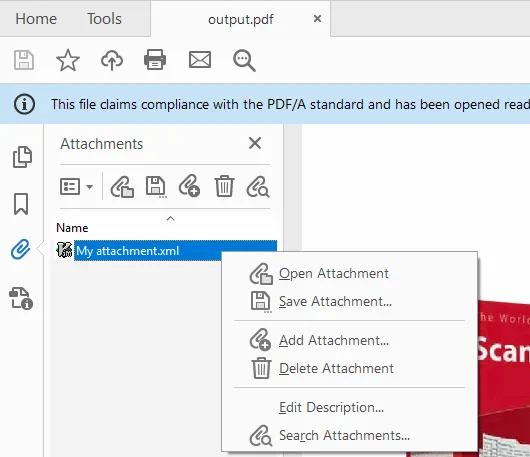
Image 1. “Attachments” tab of the created PDF document