Data Extraction
The data extraction feature enables you to perform fuzzy search across various data types:
- Numbers/Amounts
- Dates
- Regular expressions
- Plain text
The article below explains how to get started with this feature.
Data extraction is a module-locked feature. To use it, you need a valid license key. To activate data extraction, create a CIDRSLicense object and call CIDRSSetup::SetupModule() to load the module.
Data extraction flow
Section titled “Data extraction flow”The data extraction API takes as input a CPageContent object that contains OCR results. The image is not needed to start the process. After processing, the API returns the results as a CSearchResultArray.
Basic search
Section titled “Basic search”You can perform basic searches by creating one of the following context classes:
CNumberSearchContext: searches for numbers. The class provides also some parameters to configure the search.CTextSearchContext: searches for keywords in the text.CRegexSearchContext: searches for all text that matches a given regular expression.CDateSearchContext: searches for all dates in the document.
A search can include one or more CSearchContext objects.
The example below shows how to set up, run, and parse a data search.
  // Initialization  CIDRS objIdrs = CIDRS::Create();  CImageIO objImageIO = CImageIO::Create(objIdrs);  CImage objImage = objImageIO.Load<CImage>(strImageFile);
  // Preprocessing + Recognize text to get OCR results filled  CTextRecognition objTextRecognition = CTextRecognition::Create(objIdrs);  CPageContent objPageContent = objTextRecognition.RecognizeText(objImage);
  // Create search contexts  // In this example we will search for:  // - Emails in the document  // - All text matching "IRIS" keyword  CRegexSearchContext objEmailSearchContext = CRegexSearchContext::Create("([A-Za-z0-9.-]+)@([A-Za-z0-9]+)\\.([A-Za-z0-9]+)");  CTextSearchContext objTextSearchContext = CTextSearchContext::Create("IRIS");
  CSearchContextArray xobjSearchContexts = CSearchContextArray::Create();  xobjSearchContexts.AddTail(objEmailSearchContext);  xobjSearchContexts.AddTail(objTextSearchContext);
  // Launch data extraction  CSearchResultArray xobjSearchResults = CDataExtraction::ExtractData(objPageContent, xobjSearchContexts);
  // Parsing the results  // A CSearchResult is linked to a CSearchContext. If you w  for (const CSearchResult& objResult : xobjSearchResults)  {    for (const CSearchMatch& objMatch : objResult.GetMatches())    {      std::cout << "Found match for context '" << objResult.GetIdentifier().c_str() << "': '" << objMatch.GetFormattedText().c_str() << "'" << std::endl;      std::cout << "Zone: x1= " << objMatch.GetBoundingBox().iLeft << " x2= " << objMatch.GetBoundingBox().iRight        << " y1= " << objMatch.GetBoundingBox().iTop << " y2= " << objMatch.GetBoundingBox().iBottom << std::endl;    }  }
// Initializationusing (CIDRS objIdrs = new CIDRS())using (CImageIO objImageIO = new CImageIO(objIdrs))using (CImage objImage = objImageIO.Load<CImage>(strImageFile))using (CTextRecognition objTextRecognition = new CTextRecognition(objIdrs)){ // Recognize text to get OCR results filled var objPageContent = objTextRecognition.RecognizeText(objImage);
// Create search contexts // In this example we will search for: // - Emails in the document // - All text matching "IRIS" keyword var objEmailSearchContext = new CRegexSearchContext("([A-Za-z0-9.-]+)@([A-Za-z0-9]+)\\.([A-Za-z0-9]+)"); var objTextSearchContext = new CTextSearchContext("IRIS");
var xobjSearchContexts = new CIDRSObjArray<CSearchContext>(); xobjSearchContexts.Add(objEmailSearchContext); xobjSearchContexts.Add(objTextSearchContext);
// Launch data extraction var xobjSearchResults = CDataExtraction.ExtractData(objPageContent, xobjSearchContexts);
// Parsing the results // A CSearchResult is linked to a CSearchContext. If you w foreach (var objResult in xobjSearchResults) { foreach (var objMatch in objResult.Matches) { Console.WriteLine("Found match for context {objResult.Identifier} : '{objMatch.FormattedText}'");
Console.WriteLine("Zone: x1= {objMatch.BoundingBox.iLeft} x2= {objMatch.BoundingBox.iRight} y1= {objMatch.BoundingBox.iTop} y2= {objMatch.BoundingBox.iBottom}"); } }}Advanced search: Chained search
Section titled “Advanced search: Chained search”The data extraction feature supports chained searches. In a chained search, the result of one search depends on the result of its parent search. Each basic search context includes a method called FollowedBy(). This method takes two parameters:
- a CSearchContext object
- a direction to look for (e.g., Left, Right, Up, DownLeft)
Example:
Consider the following image:
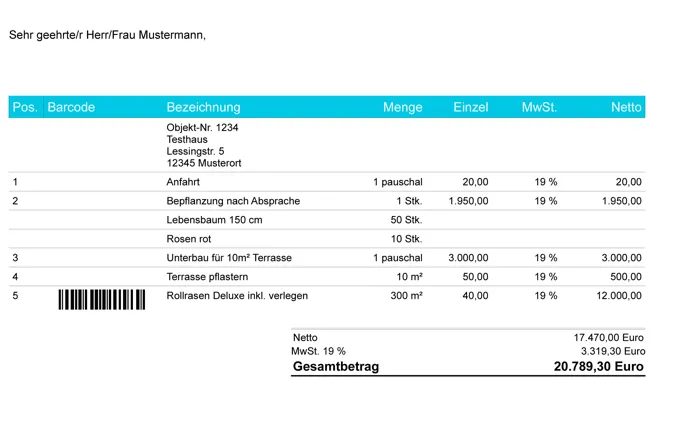
// Searching the Net Amount line// Will create a chain looking for "Netto" followed by a number, followed by a currency (= regex search)const auto objNetAmount = CTextSearchContext::Create("Netto")                                             .FollowedBy( MatchPosition::Right, CNumberSearchContext::Create() )                                             .FollowedBy( MatchPosition::Right, CRegexSearchContext::Create("[a-zA-Z$€]+") );
// Adding the VAT number.// This is equal to the search for net amount auto objCurrency = CRegexSearchContext::Create("[a-zA-Z$€]+"); objCurrency.SetIdentifier("Currency"); auto objAmountWithCurrency  = CNumberSearchContext::Create().FollowedBy( MatchPosition::Right, objCurrency ); objAmountWithCurrency.SetIdentifier("Amount"); auto objVATAmount = CTextSearchContext::Create("MwSt. 19 %").FollowedBy( MatchPosition::Right, objAmountWithCurrency ); objVATAmount.SetIdentifier("VATAmountKeyword");
 CSearchContextArray objSearchContexts = CSearchContextArray::Create(); objSearchContexts.AddTail(objNetAmount); objSearchContexts.AddTail(objVATAmount);