Document conversion workflow
Conversion of multipage documents
Section titled “Conversion of multipage documents”If you want to take advantage of multithreading, you can use the interface IPageQueue or its implementation CRangedPageQueue to start the multipage document conversion right at the beginning of the OCR processing.
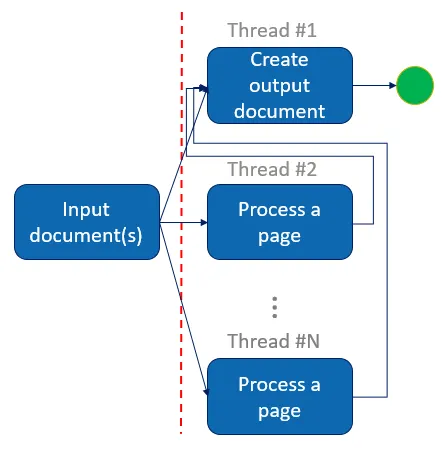
Image 1. Document conversion workflow using CRangedPageQueue
So you can use the processed pages as soon as the output document engine has retrieved them.
Code snippets
Section titled “Code snippets”Usign CRangedPageQueue in a multithreaded document conversion workflow with C++ API and OpenMP instructions
// Create the ranged page queue with an appropriate size, according to available// memory and number of OCR threads.CRangedPageQueue objRangedPageQueue = CRangedPageQueue::Create ( 9 );omp_set_nested ( 1 );#pragma omp parallel sections num_threads(2){  // First thread will start document output  #pragma omp section  {    CDocumentOutput objDocumentOutput = CDocumentOutput::Create ( CIDRS::Create ());    objDocumentOutput.Save ( strOutputPath, objOutputParameters, objRangedPageQueue );  }  #pragma omp section  {    // The 3 other threads will be performing OCR    const int iProcessingThreadCount = 3;    #pragma omp parallel num_threads(iProcessingThreadCount)    for ( ... )    {      // Retrieve the number of the next page to process      IDRS_INT iPageToProcess = ( ... );
      // Load and process it      CPage objPage = CPage::Create ( ... );
      // ...
      // Once process is done, wait until the queue is able to store this page      // before starting processing of a new one      while ( ! objRangedPageQueue.TryAddPage ( objPage, iPageToProcess ))      {        Sleep ( 50 );      }    }    // When the end of the document is reached, close the page queue    // to complete document creation.    objRangedPageQueue.Close ();  }}
Using CRangedPageQueue in a multithreaded document conversion workflow with .NET API
// Create the ranged page queue with an appropriate size, according to available// memory and number of OCR threads.CRangedPageQueue objRangedPageQueue = new CRangedPageQueue(9);
// Start document output in a separate threadThread objOutputThread = new Thread(() =>{  CDocumentOutput objDocumentOutput = new CDocumentOutput(new CIDRS());  objDocumentOutput.Save(strOutputPath, objOutputParameters, objRangedPageQueue);});objOutputThread.Start();
// Then start OCR in 3 other threadsconst int iProcessingThreadCount = 3;Parallel.For(...,  new ParallelOptions { MaxDegreeOfParallelism = iProcessingThreadCount },  ... =>{
  // Retrieve the number of the next page to process  UInt32 uiPageToProcess = (...);
  // Load and process it  using (CPage objPage = new CPage(...))  {    // ...
    // Once process is done, wait until the queue is able to store this page,    // before starting processing of a new one    while (!objRangedPageQueue.TryAddPage(objPage, uiPageToProcess))    {      Thread.Sleep(50);    }  }});
// When the end of the document is reached, close the page queue// to complete document creation.objRangedPageQueue.Close();
// Wait for the document output thread completion before exitingobjOutputThread.Join();